Blogger SEO Settings
Search Engine Optimization (SEO) is crucial for increasing your blog's visibility in search results. By properly configuring your Blogger settings and optimizing your theme, you can significantly improve your blog's search engine rankings and user experience.
Basic SEO Settings
These fundamental settings form the foundation of your blog's SEO strategy:
Title and Description
Your blog title and description are critical for SEO as they help search engines understand what your blog is about.
Blog Title
Path: Settings > Basic > Title
Blog Description
Path: Settings > Basic > Description
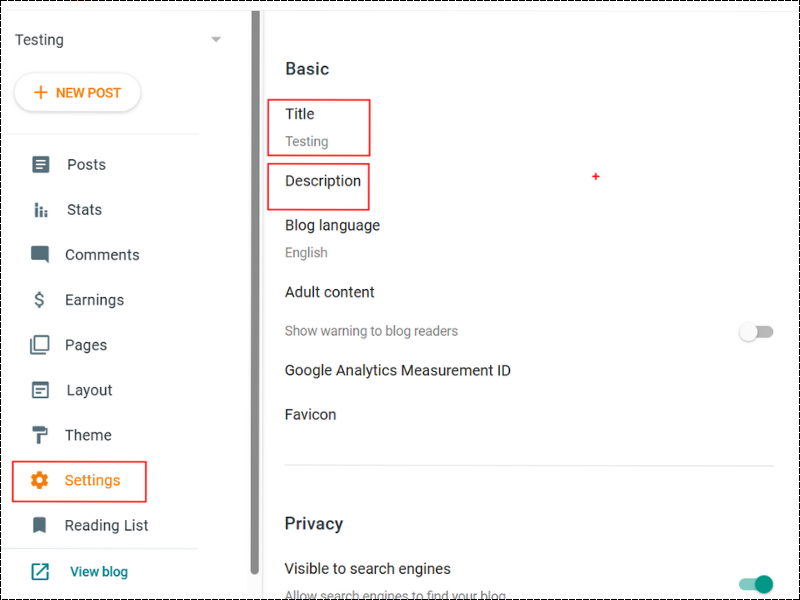
Screenshot: Blogger Title and Description Settings
Custom Robots.txt
A robots.txt file tells search engine crawlers which pages or sections of your site should not be processed or scanned.
Enable Custom Robots.txt
Path: Settings > Crawlers and indexing > Enable custom robots.txt
Add Recommended Robots.txt Code
Add the following code to your robots.txt:
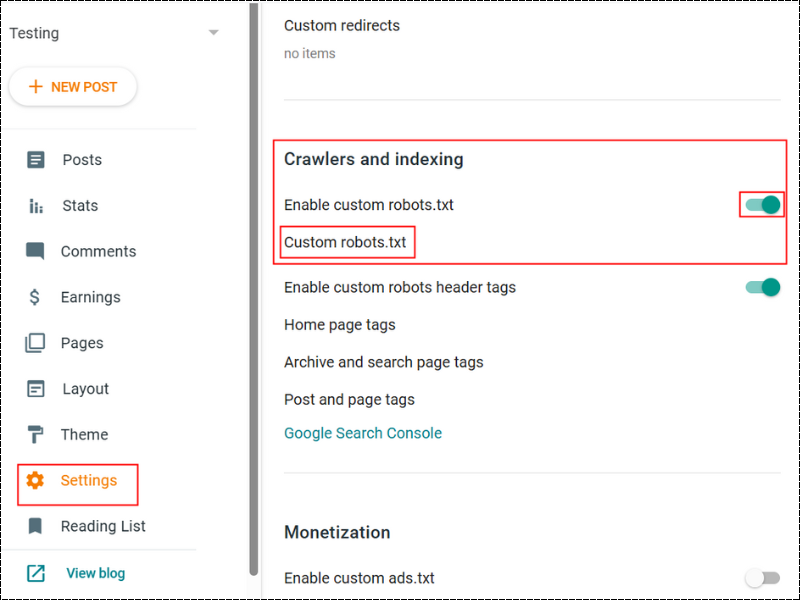
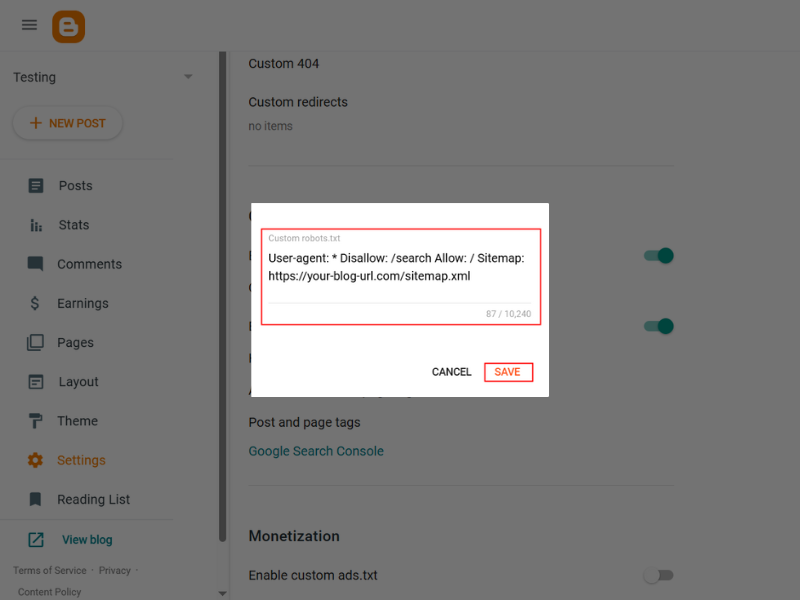
Screenshot: Blogger Custom Robots.txt Settings
Custom Robots Header Tags
Robots header tags provide more granular control over how search engines index specific pages of your blog.
Enable Custom Robots Header Tags
Path: Settings > Crawlers and indexing > Enable custom robots header tags
Configure Robots Header Tags
Set the following configurations:
- Homepage: All, noodp
- Archive and search pages: noindex, noodp
- Default for posts and pages: All, noodp
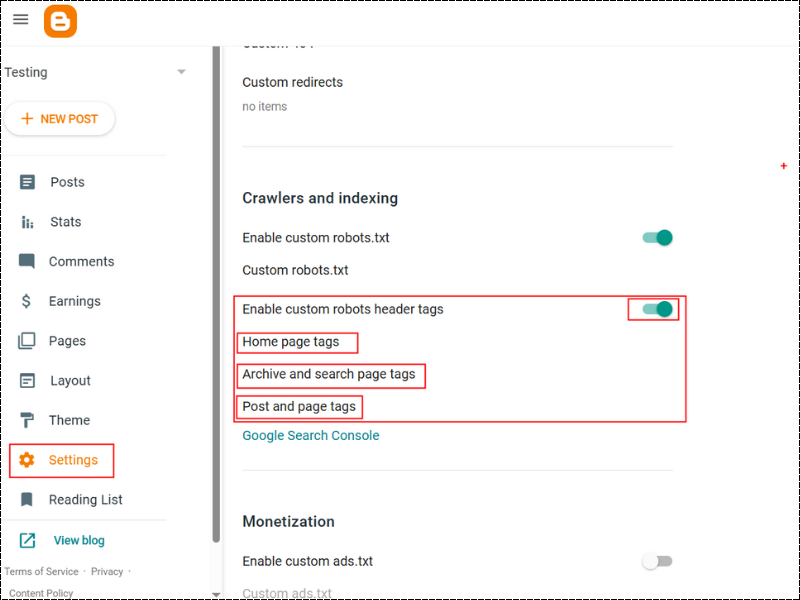
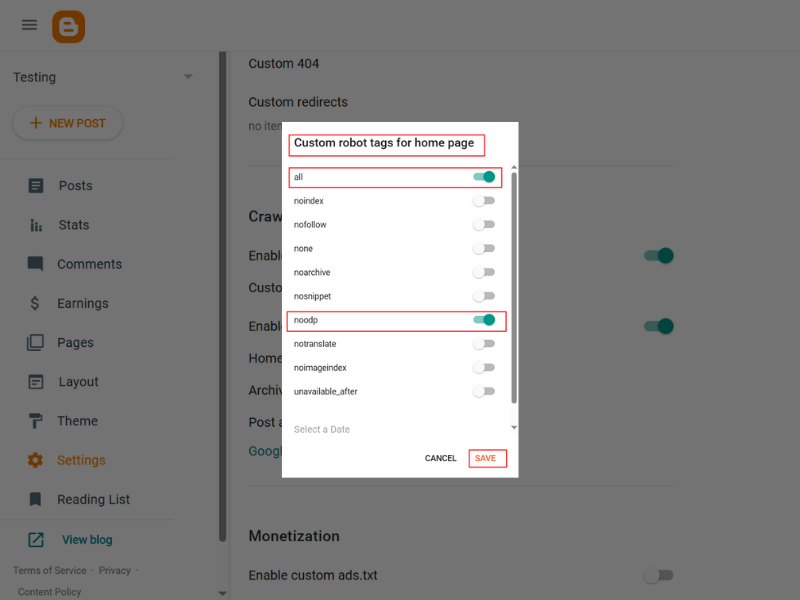
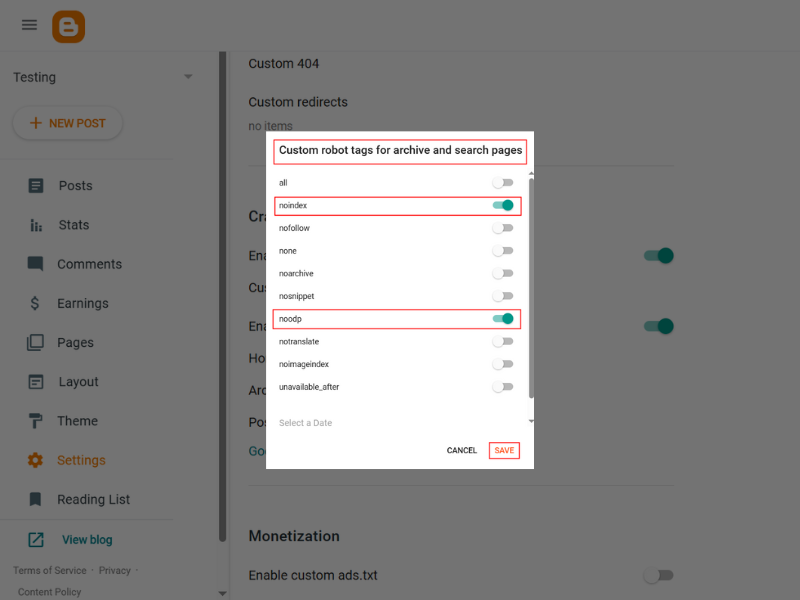
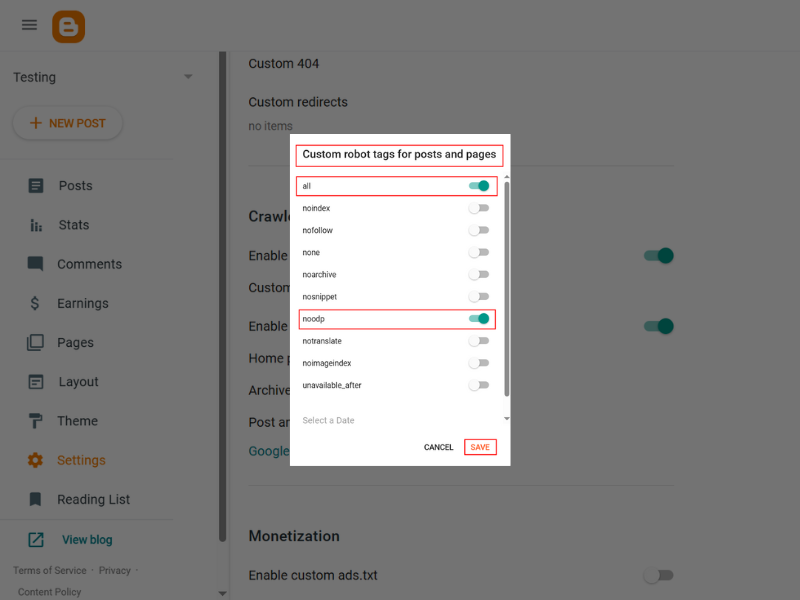
Screenshot: Blogger Custom Robots Header Tags Settings
Search Description
Search descriptions (meta descriptions) provide a brief summary of your page content in search results.
Enable Search Description
Path: Settings > Meta tags > Enable search description
Add Blog-Level Meta Description
Add a meta description for your entire blog that summarizes your content and includes key phrases.
Add Post-Level Search Descriptions
For each post, add a unique search description that accurately summarizes the content and includes relevant keywords.
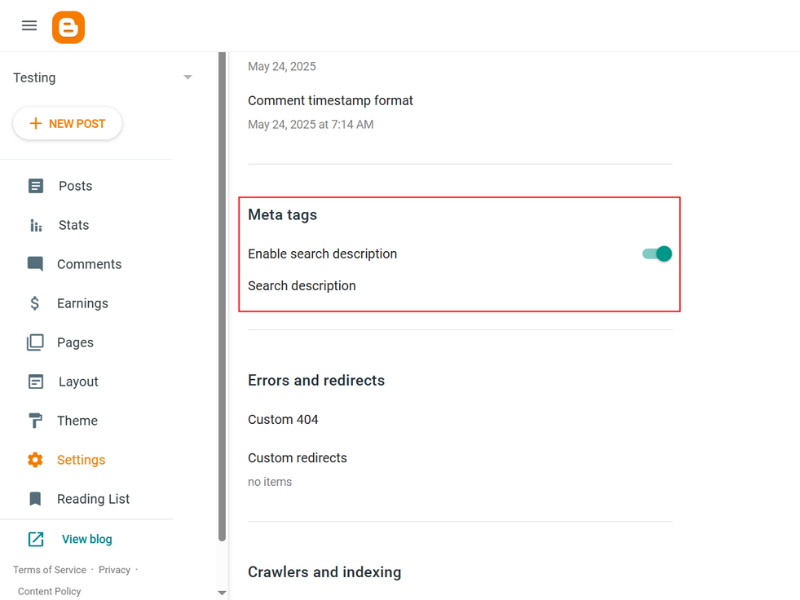
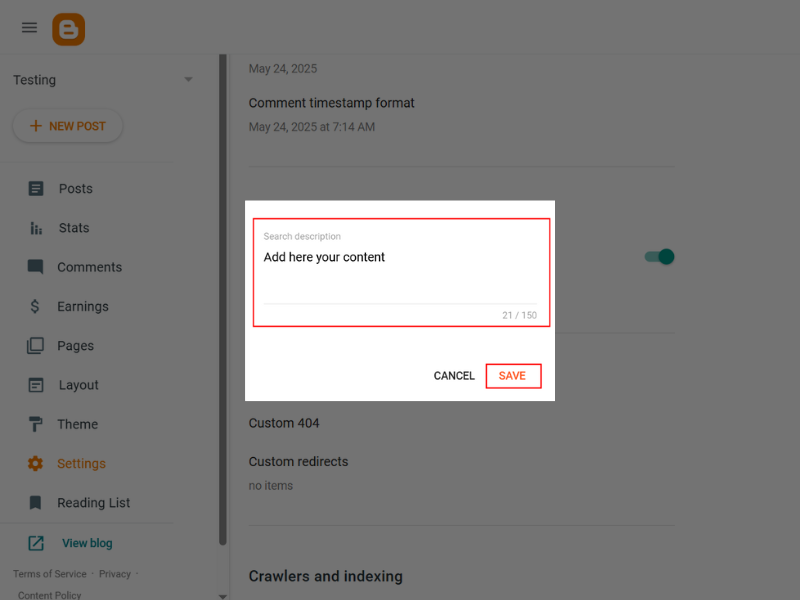
Screenshot: Blogger Search Description Settings
Theme Optimization Settings
Optimizing your theme is crucial for both SEO and user experience:
Mobile-Friendly Theme
With mobile-first indexing, having a responsive theme is essential for SEO.
Use a Responsive Theme
Choose a responsive theme like Contempo, Soho, or a custom SEO-optimized theme that adapts to different screen sizes.
Enable Mobile Version
Path: Theme > Customize > ▼ > Mobile Setting
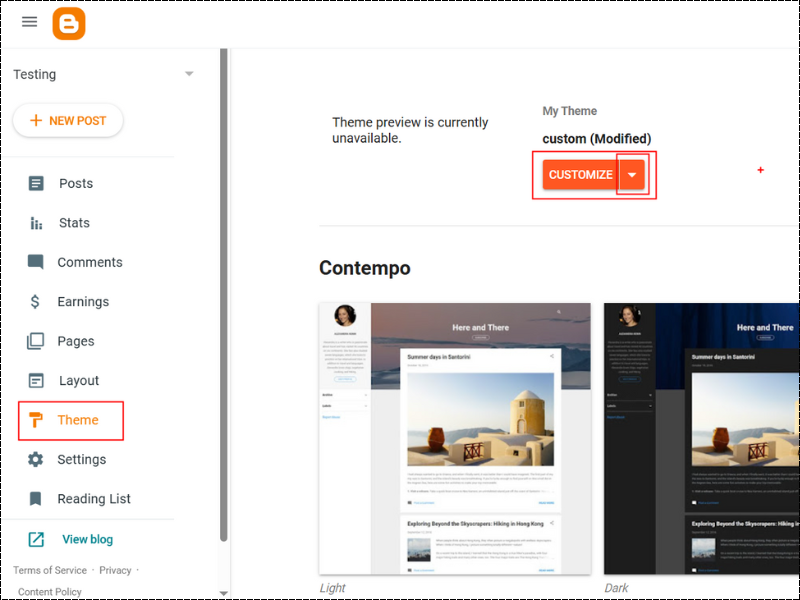
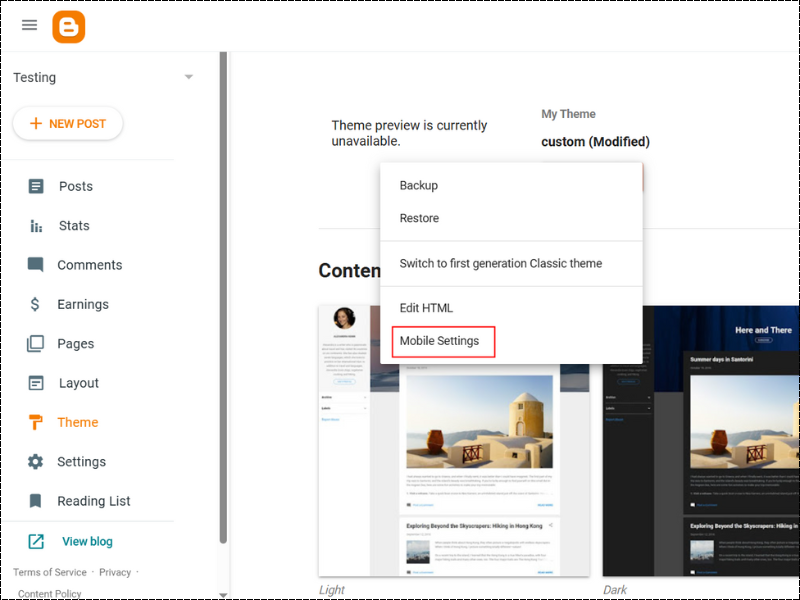
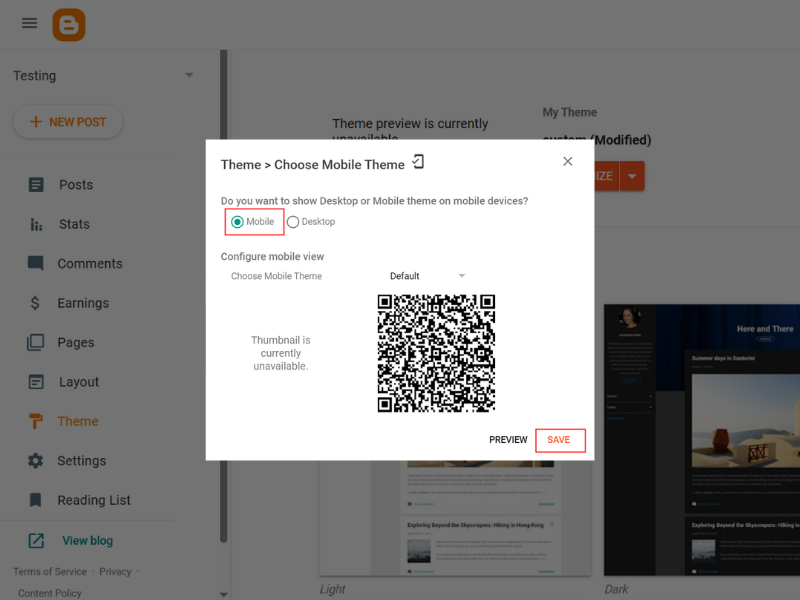
Screenshot: Blogger Mobile Theme Settings
Remove Unused Widgets
Unnecessary widgets can slow down your blog and create a cluttered user experience.
Audit and Remove Widgets
Path: Layout
Review and remove default widgets that aren't providing value to your readers, such as:
- Blog Archive (if not needed)
- Followers widget
- Unused social media widgets
- Redundant navigation elements
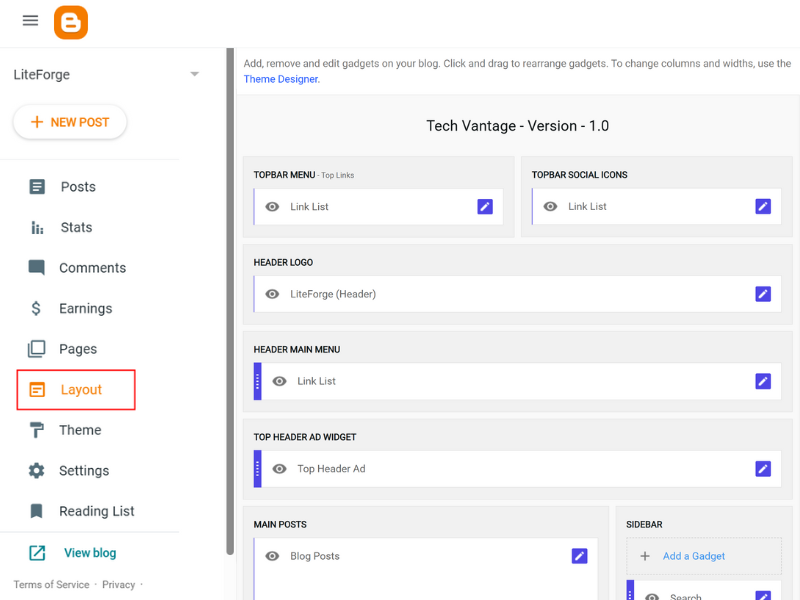
Screenshot: Blogger Layout Settings
Use Compressed Images
Large image files can significantly slow down your blog and hurt your SEO rankings.
Optimize Image Formats and Sizes
Follow these best practices for images:
- Use WebP format when possible (best compression-to-quality ratio)
- For wider compatibility, use compressed PNG for graphics and JPEG for photos
- Keep image file sizes under 100 KB when possible
- Resize images to the actual dimensions needed on your page
Other SEO Best Practices
Implement these additional SEO best practices to further improve your blog's search engine visibility:
Use HTTPS
HTTPS is a ranking factor for Google and provides security for your visitors.
Path: Settings > HTTPS
Action: Enable HTTPS and redirect to HTTPS
Custom Domain
Using a custom domain instead of *.blogspot.com improves credibility and branding.
Path: Settings > Basic > Publishing > Custom domain
Action: Set up and use a custom domain for your blog
Add Favicon
A favicon helps with branding and recognition in browser tabs.
Path: Theme > Customize > Advanced > Favicon
Action: Upload a 16x16 or 32x32 pixel favicon image
Internal Linking
Link to your own articles where relevant to improve SEO and user experience.
Best Practice: Include 3-5 internal links in each post to related content on your blog
Action: Regularly update older posts with links to newer, related content
Image Alt Tags
Always add descriptive alt text to images for accessibility and SEO.
Format: <img src="image.jpg" alt="Descriptive text about the image" />
Best Practice: Make alt text descriptive, include keywords when relevant, but avoid keyword stuffing
Submit to Search Engines
After implementing the SEO settings above, submit your blog to search engines to ensure it gets indexed properly:
Google Search Console
- Go to Google Search Console
- Add and verify your property (blog)
- Click on "Sitemaps" in the left sidebar
- Enter "sitemap.xml" in the "Add a new sitemap" field
- Click "Submit"
Bing Webmaster Tools
- Go to Bing Webmaster Tools
- Add and verify your site
- Click on "Sitemaps" in the left sidebar
- Enter your sitemap URL (e.g., https://your-blog-url.com/sitemap.xml)
- Click "Submit"
SEO Monitoring and Maintenance
SEO is not a one-time task but an ongoing process. Here are some recommendations for maintaining your blog's SEO:
- Regularly check Google Search Console for issues and opportunities
- Update old content to keep it fresh and relevant
- Monitor your site's loading speed using tools like PageSpeed Insights
- Track your rankings for key search terms
- Stay updated on SEO best practices as search algorithms evolve